Mac · Windows · Linux · iPhone · Android

Your clipboard.
Right inside your keyboard.

Copy on your Mac, paste on your Android. Copy on Windows, paste on your iPhone — straight from your phone's keyboard. No app-switching, no emailing yourself. One clipboard across your devices.

Real-time — usually there before you need it Free · Mac, Windows, Linux, iPhone & Android
~ $ brew install ffmpeg
Copied on Mac Encrypting…
#dev-team
how do I install it?
brew install ffmpeg
Message…
All Text Code Link
9mK2·qX7z·R8f4·bN2p Decrypting… brew install ffmpeg now
OTP 482 193 1m
github.com/syncer/app 28m
#FFD400 5m
•••••••••• 25m
Copy here, paste there across ·macOS ·Windows ·Linux ·iPhone ·Android
Where Syncer is different

Your clipboard, on your phone's keyboard.

Most clipboard tools stop at the desktop. Syncer's keyboard works across the apps you type in every day — so whatever you copied on your laptop is one tap away, right where you're typing. No app-switching. No "let me send this to myself." Just paste and move on.

1
Copy something on your desktopA link, a command, a wall of text.
2
Open the app you're typing inMessages, Notion, a browser, a form.
3
Tap it on the Syncer keyboardPasted at your cursor. That's the whole thing.
Download free
Syncer keyboard on iPhone inside a chat: a teammate asks for the pull-request link, and it's one tap away on the Syncer keyboard
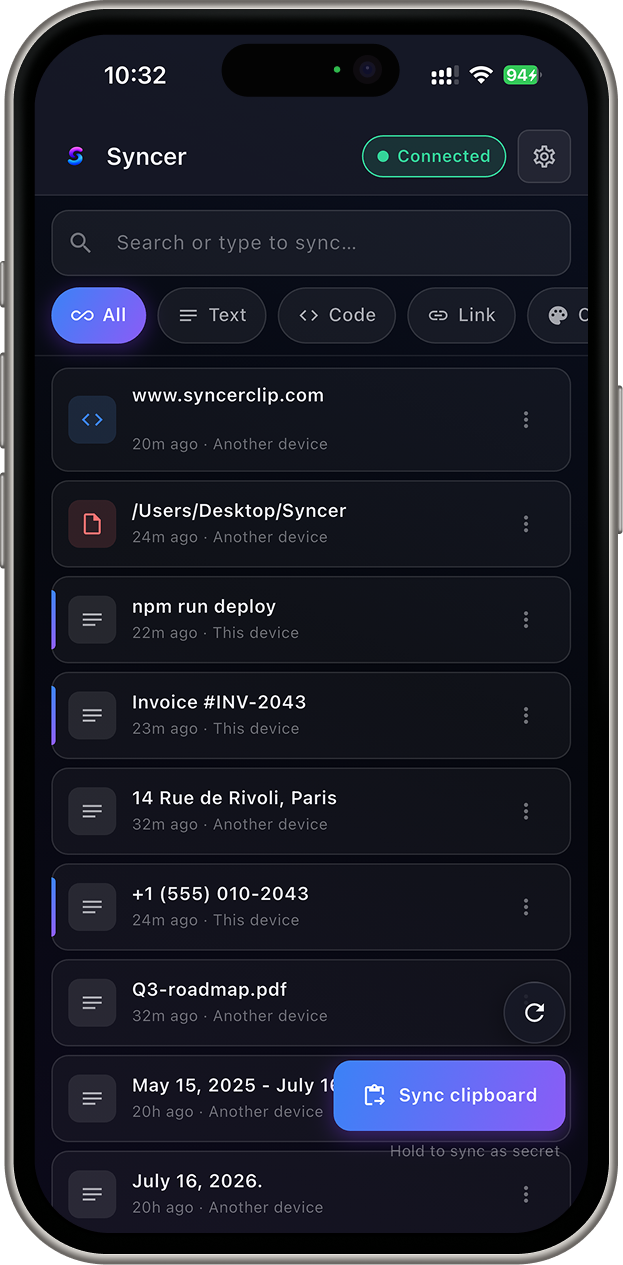
Syncer app on iPhone: searchable clipboard history synced across devices, with type filters and a Sync clipboard button
Copied on your Mac
github.com/you/repo
tap it on your phone's keyboard
Pasted into Slack. Done.
Copied on your Mac
ssh root@server
switch to your Linux box
Pasted in the terminal. Done.
Copied on your desktop
OTP  583 214
tap on your phone
Pasted into the login form. Done.
Works inside WhatsApp Works inside Gmail Works inside Slack Works inside Notion …and the apps you use every day

Desktop to desktop, just the same.

Not everything belongs on your phone. Copy on your Mac, paste on your Linux box or Windows PC — the same clipboard, across your computers.

~ $ terraform apply
Copied on Mac
user@linux:~$ terraform apply
Clipboard history

Your recent clipboard, searchable.

Your synced clips are searchable and organized. That command from this morning, the invoice number from Tuesday, the address from last week — search, find, paste. It's all on-device and encrypted, and it expires on your schedule.

Try it — type in the search and watch it filter. Every clip is on-device and encrypted.

Keeps 7 days of searchable history — all on your device.

Clipboard history

    Stop emailing yourself links, notes, and codes.

    The little ritual you do a dozen times a day — and how it goes with Syncer.

    Before Syncer

    6 steps · ~40s
    Copy the link
    Email it to yourself
    Open Gmail
    Copy it again
    Switch app
    Paste

    With Syncer

    2 steps · ~2s
    Copy the link
    Paste right where you need it.
    Already done
    No inbox. No app-switch. No sending yourself messages — just copy and paste.
    Syncer deletes the whole ritual. Copy. Paste. Done.
    Security

    Your clipboard is encrypted
    before it leaves your device.

    We relay encrypted data. We never see what's inside. Every synced clip is sealed on your device with a key only your own devices hold — we use the Signal Protocol to pair and verify those devices, never to read your clipboard.

    • Encrypted on-device, alwaysClips are sealed before they're sent. Our servers only ever handle ciphertext.
    • No tracking, no ads, no resaleWe don't log what you copy or build a profile. There's nothing to sell.
    • Verify devices, revoke instantlyCompare a safety fingerprint to verify a new device, protect approvals with biometrics, and cut any device's access with one tap.
    • Send to one device onlyNeed to move a sensitive clip? Encrypt it for a single device instead of fanning it out to all of them.
    Read the full security page → Is clipboard sync safe? →

    Syncer vs. the clipboard tools you've tried

    Some sync within one ecosystem. Some never leave the desktop. Among these, only Syncer spans all five platforms.

      Syncer Apple Universal Clipboard Paste Raycast
    macOS
    Windows
    Linux
    iPhone
    Android
    All five in one clipboard
    Synced clipboard history in a phone keyboard

    Platform support and features as publicly documented at time of writing. Paste and Raycast are excellent tools. Syncer's edge: one clipboard across all five.

    Download Syncer — free

    Install it on your devices. One clipboard, everywhere, in a couple of minutes.

    Free for everyday sync. A quick email sign-in links your own devices — so only you can read your clips.

    Shape what comes next.

    Already downloaded? Leave your email to hear when new features land and tell me what to build. Only your email is required; the rest is optional.

    Something broke — try again, or just email [email protected].
    No spam. Occasional updates only. Unsubscribe any time.

    You're in 🎉

    Thanks — I'll email you when there's news.

    S

    Why I built this

    I kept emailing myself links. Typing 2FA codes by hand off my laptop screen. Losing that one command somewhere between my Mac and a server. Everything I tried either stayed inside one ecosystem or left one of my devices behind.

    It annoyed me enough that I finally built the fix — one clipboard that follows me across my devices, and doesn't read my data on the way. If that sounds like your day too, you'll get it.

    — the founder

    The questions you're actually asking

    Can my employer — or you — read my clipboard?
    Not in transit. Clips are encrypted on your device before they're sent, so nobody on the network path — us, your ISP, your employer's network, anyone sniffing the wire — can read them. Only your own paired devices hold the keys. (One honest caveat: no app can protect a device that's already compromised. Software running on the machine itself — corporate monitoring, device-management agents, malware — sees your clipboard before any app encrypts it. That's true of every app on that device, not just Syncer.)
    Does it actually work between iPhone and Windows (or Android and Mac)?
    Yes — that's the entire point. iPhone ↔ Windows, Android ↔ Mac, Linux ↔ iPhone, any combination; Syncer doesn't care which ecosystems your devices come from. Desktop → phone is automatic. One nuance: an iPhone copy syncs out the moment you open Syncer or its keyboard — iOS doesn't allow background clipboard reading, so that one direction takes a tap.
    How fast is it?
    Real-time. It rides a live connection rather than a slow poll, so in practice it's usually waiting on your other device by the time you switch to it.
    What happens to passwords and 2FA codes?
    Passwords and anything your OS or password manager marks sensitive are never synced at all — they stay on the device you copied them on. (Auto-expiring one-time codes, so they don't linger in your history, is a planned feature.)
    Do I need an account?
    Yes — a lightweight one. A quick email sign-in verifies which devices are yours and pairs them together, so only your own verified devices can sync and read your clips. No password to remember, and the account never gives Syncer the ability to read your clipboard.

    Make your clipboard work everywhere.

    Download free